
Service Design for B2B Supply Chain Onboarding in Canada
In 2020, I joined a product squad at GS1 Canada as UX Lead, this case study shows my UX processes delivered business ROI.
Role: UX Lead (user research and design strategy)
Location: Toronto, Canada
Project: SLM (Subscriber Lifecycle Management) onboard, engage, retain new users; improve efficiency for existing customers
Team: 1 Agile Coach, 1 Product Manager, 1 UX Lead (me), 1 Business Analyst, 1 Scrum Master, 5 Developers (3 internal, 2 external), 1 QA Tester, 1 Journey Owner (executive)
How usability drove user value and measurable internal & external ROI.
$1.5+M
CAD/year, Business revenue generated through UX design lead conversion and cutting back on manual internal process.
2X
Increase, monthly lead conversions due from fast onboarding and elimination of cognitive overload in signup processes.
4 MIN
Onboarding, Cut a 20-minute process down to instant activation, replacing a 1 to 7 business day wait.
17%
reduction, In support calls, improved user satisfaction scores. Knowing Customer Identity Access (CIAM) upfront fast tracked service.
10K
Net new users, User base grew from 24K (2019–2022) to over 34K within one year of launching the new onboarding journey for lead conversion in 2022.
KYC
& Sales funnel, Introduced basic Know Your Customer for new visitors, enabling more accurate need targeted marketing campaigns.
Phase 1 - Why

The objective was to clarify what we were building and why it mattered. I uncovered the “why” and design values, while the Product Manager defined the product vision. Together, we aligned design and product to secure business buy-in.
Phase 2 - Process

The objective was to define an execution strategy that prioritizes the right level of enhancement and effort avoiding over-design and over-engineering through continuous testing and learning.
Phase 3 - The Outcome

The goal is to build a design roadmap that scales current solutions while planning next steps based on deployment impact on product KPIs and business metrics. Success is measured, refined, and iterated through testing.
Phase 1 - The Why
Rational behind prioritization and how is this a service design?
Service Design
A review of the onboarding SOP showed that meaningful UX improvement required changes beyond the UI. I identified heavy operational effort, complex logistics, technical dependencies, and manual processes that needed revision for design to drive real business value.
Backlog Prioritization
Partnered with the Product Owner to review backlog quality and challenge assumptions behind the goal of growing from 24K to 40K users by 2023. Surfaced key pain points and helped re-prioritize epics around an evidence-based product vision.
According to my hypothesis, the current onboarding processes were preventing the organization from capturing $400K+ CAD in monthly revenue.
Analysis on effort and time cost to business SOP
CRM business and call log analysis mapping how the current teams managing tickets and classify them into themes.
Analysis inference on business revenue loss
Use the same CRM data to show the user behaviour impact from $$$ value to help business understand the loss.
Key Insights on Business inefficiency
✓ Validation Delays: Manual processes caused 2-week activation delays, cutting lead conversion by 55-60%.
✓ Operational Strain: Manual CRM entries and executive sign-offs overburdened teams.
✓ Tech Gaps: Lack of automation strained resources and delayed workflows.
✓ Revenue Loss: Payment inefficiencies and external dependencies hurt customer satisfaction and data sync.
My Strategic Thinking
I prioritized context-setting over jumping straight into user-research, helping the business see how internal processes were impacting customer experience. This groundwork later allowed UX methods to scale and demonstrated the strategic value of UX.
Phase 2- The Processes (UX Research & Analysis)
With clear context and purpose defined, I led the core design process, spanning UX research, analysis, and insight-driven design execution.
Step 1, Understand: Before presenting research, I facilitated a design workshop where internal teams defined the SME persona themselves. This built alignment through empathy and exposed the gap between assumptions and real user needs
Step 2 , Show the gap: Empathy mapping revealed how SMEs actually experience the GS1 brand, exposing the gap between internal assumptions and real user perception.
Step 3, Artifact: Document user personas, journeys, and research insights in the project management system and backlog, using scalable templates shared across product, design, and engineering teams.
Step 4, Requisite: Personas were designed to be operational, not ornamental. I led workshops to build shared empathy and embedded them into user stories, backlog prioritization, and QA validation.
User-journey, Persona & Empathy Workshop Outcomes
Aligned the business on who an SME is and the values they seek in exchange of giving us business growth (considering them representing the highest user segment of our business.
Make user interviews and personas being understood and exemplify what does inclusive UX design processes feels like.
Mapped how users perceive the business to build true empathy with the moment of truth that is irrefutable based on how I communicated and delivered the message through design thinking processes.
Operationalized a research utilization processes in Azure DevOps as acceptance criteria and embedded them in the shared Product/UX research repository.
Phase 2.1 - The Process (Design & Prototype)
At this stage, my process goal was to translate research into actionable design insights. To do so, I defined a set of custom design guiding principles shaped by business context, user research, and industry-recognized UX heuristics, rather than adopting a standard UX playbook available online.
Design guiding principles → from research to execution
Principle
Language simplification
In-app education
Validation & recovery
System speaking back
Relatable visual experience
What it solved
High cognitive load caused by internal business terminology
Users unsure what they were paying for or what happens next.
Errors, guesswork, and fear of making mistakes
Low trust due to lack of system feedback
Overwhelm in data-heavy workflows
How it showed up in the product
Replaced internal labels with user-intent language (e.g., “Get a barcode” instead of “Become a GS1 subscriber”) to remove friction and unblock task start
Upfront expectation-setting, contextual help text, and tooltips delivered the right information at the right moment without breaking flow
Real-time validation, self-service correction, and pause/resume flows reduced friction while preserving user control
Progress indicators, dynamic fields, clear error reasoning, recommended fixes, and next-step prompts made the system feel responsive
Minimal UI inspired by familiar eCommerce patterns, allowing users to focus on tasks and not learning the interface
Before: Old Onboarding Screens
Pain points: Cognitive overload caused by complex language, guesswork, and frequent input errors.
Misguided flow: Step 1 expands after Next, obscuring progress and introducing irrelevant questions due to a one-size-fits-all form.
Confusing experience: One-size-fits-all forms surfaced irrelevant questions that weren’t captured in CRM and served only internal validation needs.
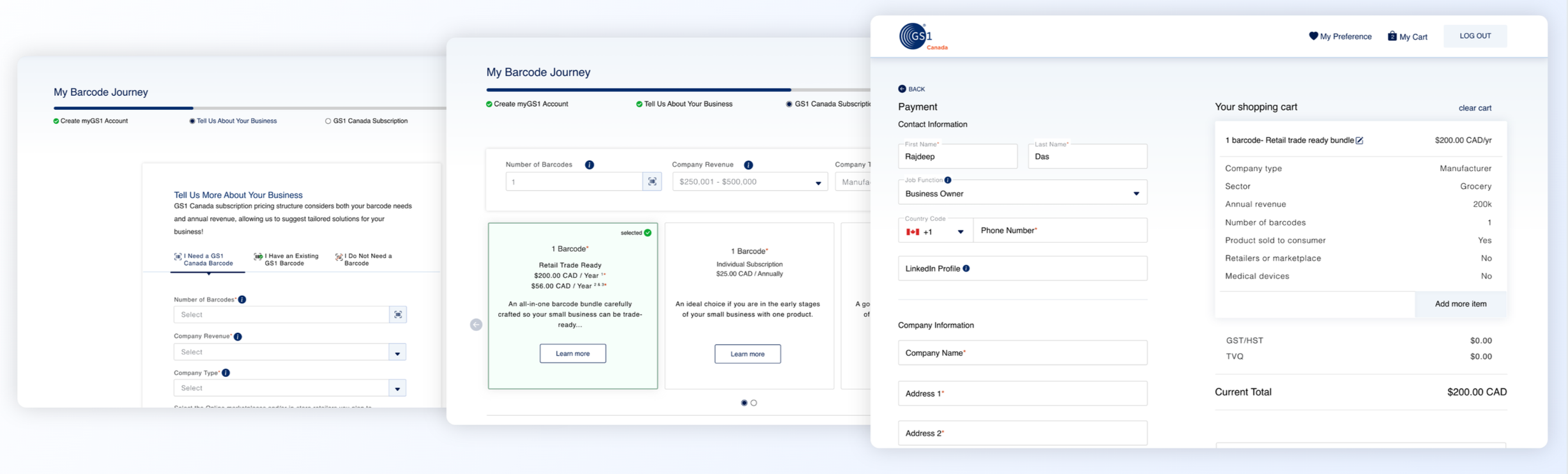
Solution (for testing): Reduced clicks, upfront pricing, and minimal required inputs improved clarity and transparency.
System feedback (real time): The progress bar reflects true progress, and persona-irrelevant fields are removed after user classification.
Relevance & CRM mapping: Industry-specific data is captured and stored in CRM to support downstream services and timely call-centre access.
After: Redesigned Onboarding Screens
Phase 2.2 - System Process Improvement
Alongside business process improvements, my service designs work at underlying layer focused on refining the technical flow. Ensuring the usability design operate more efficiently.
Before: Technical map per business flow was made per usecase
After: Technical map scale one standard flow for all business levels
Before: Database ping took time due to lack of integration between IAM and CRM
After: Integrate IAM and CRM system during activation processes reduce manual triage.
Phase 3 Outcomes - Test prototypes for customer value
At this stage my objective was to do user interviews to evaluate the speed, accuracy and if the promised values are being delivered to end user. What Insights could I take for design backlog and future iteration.
I conducted 15 usability tests using prototypes with recent GS1 Canada users, focusing on the task of registering and creating a barcode The goal was to iterate and refine the design before development and deployment.
Focus area on User Jobs To Be Done Touch-points
✓ Device usage: 98% of users completed registration on laptops or desktops.
✓ Post-registration actions: Observed real-world next steps, such as retailer outreach and packaging preparation.
✓ Payment & barcode creation: Analyzed behaviour during checkout and symbology setup.
✓ Task drop-off: Identified moments of friction and demotivation.
✓ Error handling: Evaluated responses to missing information, edge cases, and technical challenges.
Measure outcomes - Usability design reflects on improved Product KPI
Post-deployment, the impact became clear: improved usability drove stronger product KPIs, which translated into measurable business outcomes and customer success.
The metrics highlight business growth in lead conversion and GS1 Canada subscriptions, driven primarily by a Lean, self-serve onboarding redesign that enabled instant access to product barcodes and improved operational efficiency.
Measure outcomes - Usability improvements reflects on Business OKR
Internal ROI: I conducted further data analysis with the business intelligence team. I leveraged the metrics program that I used which connected the UX analytics tool (Hotjar and Pendo) with Product KPIs (Power BI) and added insights to what marketing, ops and sales funnel reports was indicating. I showcased how self-service of onboarding contributed to reduced customer call volumes and surfaced qualitative data showing onboarding/ subscription has been consistently requiring least internal resource since the new designs have been launched and subsequently generating the highest revenue (lead conversion and engagement)
What is Next - Design Vision & Roadmap
I created a design vision to make onboarding a three-click, accurate experience that guides users to a single platform. After I was promoted to UX team lead and principal designer, I partnered with the platform manager to integrate eight GS1 products into that single platform in 2022 and scaled SLM onboarding as SSO for all products.